Imagine a world where your Minecraft creations spring to life, doors swing open on approach, farms harvest themselves, and intricate contraptions perform feats of automated magic. This isn't just a fantasy; it's the power of Redstone, Minecraft's answer to electricity and logic. Mastering Minecraft Redstone Builds & Tutorials is your ticket to transforming passive structures into dynamic, intelligent systems.
For many players, Redstone feels like an intimidating leap, a complex web of wires and mechanics. But what if you could learn to command this powerful resource, turning simple inputs into grand, automated outcomes? This guide isn't just about showing you circuits; it's about unlocking a new dimension of creativity, efficiency, and sheer ingenuity in your blocky universe.
At a Glance: Your Redstone Journey Ahead
- Redstone is Minecraft's electricity: It powers mechanisms, controls devices, and enables automation.
- Start with the basics: Understand Redstone dust, torches, levers, and buttons before tackling complex builds.
- Core components are your toolkit: Pistons, hoppers, observers, repeaters, and comparators are essential.
- Build practical solutions: Create automatic farms, smart storage, elevators, and secure doors.
- Explore advanced concepts: Dive into logic gates, flying machines, and even in-game computers.
- Troubleshooting is part of the fun: Learn common issues and how to diagnose them.
- The only limit is your imagination: Redstone opens doors to truly unique and ambitious projects.
Unlocking Automation: What is Redstone, Really?
Think of Redstone as the nervous system of your Minecraft world, a loose analogue to electricity that allows you to control and activate various mechanisms. It's the difference between manually replanting crops and building a fully automatic farm, or a static wall versus a hidden, piston-controlled doorway. From simple light switches to elaborate railway systems and even working in-game computers, Redstone empowers you to automate virtually anything.
At its core, Redstone relies on Redstone dust, the fundamental material that acts as a wire, carrying signals across distances. But Redstone is more than just wire; it's a collection of specialized blocks, each with unique properties that allow you to manipulate, delay, strengthen, and react to these signals. This blend of simple components and intricate interactions is what makes Redstone construction so rewarding, whether you're aiming for a tiny, efficient device or a sprawling, complex machine.
Your Essential Redstone Toolkit: Core Components & Concepts
Before you can build a grand automated base, you need to understand the individual pieces of the Redstone puzzle. Think of these as your basic vocabulary before you start writing novels.
The Power Source: Redstone Dust & Torches
Redstone Dust: This is your primary "wire." Placed on blocks, it carries a signal from a power source to a mechanism. A signal travels 15 blocks before dissipating. The brighter the dust, the stronger the signal.
Redstone Torches: These are constant power sources, always outputting a signal. They can also invert a signal (turn an "on" signal "off," and vice-versa), which is crucial for logic circuits. When placed on the side of a block, they power that block.
Levers, Buttons, Pressure Plates: These are your direct inputs. Levers provide a constant "on" or "off" signal. Buttons and pressure plates provide a momentary pulse.
Controlling the Flow: Repeaters & Comparators
Redstone Repeaters: These blocks do two critical jobs:
- Repeat and Strengthen: They take a Redstone signal, output it at full strength (15 blocks), and reset its range, allowing signals to travel indefinitely.
- Delay: They can be set to introduce a delay (1 to 4 game ticks) in the signal's propagation, vital for precise timing in complex builds.
Redstone Comparators: These are more sophisticated. They have three modes: - Comparison Mode: Compares the strength of the input signal from its back to the side inputs. It outputs a signal if the back input is stronger.
- Subtraction Mode: Subtracts the side input signal strength from the back input signal strength, outputting the remainder.
- Container Sensing: When placed directly behind a container (chest, furnace, hopper), they output a signal strength proportional to how full the container is. This is key for item sorting and storage.
Activation & Reaction: Pistons, Observers & Droppers
Pistons & Sticky Pistons: These are your movers. Regular pistons push blocks one space forward. Sticky pistons push and pull blocks. They're fundamental for automatic doors, traps, and moving contraptions. A unique mechanic called Quasi-connectivity affects how pistons react to power, often surprising new builders. Essentially, a piston can be activated if the block above it receives power, even if the piston itself isn't directly powered. This is an intentional game mechanic, not a bug, and is vital for compact designs.
Observers: A truly game-changing block introduced more recently. Observers detect block updates directly in front of them and emit a quick, one-tick Redstone pulse from their back. This makes them incredibly versatile for detecting growth, changes in liquid, or activated mechanisms, enabling compact and efficient automatic farms and sensors.
Hoppers & Droppers: These manage items. Hoppers pull items from containers above them or from the world, and push them into containers below or to their sides. They are the workhorses of item transport and sorting. Droppers simply eject items from their front face when powered, while Dispensers eject or use items (e.g., shoot an arrow, place a block of water) when powered.
Crafting Your First Simple Redstone Circuits
Let's put a few pieces together for some beginner-friendly projects:
- The Automatic Door:
- Place two sticky pistons facing each other with a 1-block gap. Place your door blocks (e.g., stone) between them.
- Place a block behind each piston, with Redstone dust on top of each block.
- Run Redstone dust from these blocks to two pressure plates on either side of the door.
- When you step on the plate, the pistons retract, opening the door!
- The Simple Automatic Light:
- Place a Redstone Lamp.
- Place a lever next to or on top of it, and connect it with Redstone dust if needed.
- Flip the lever, and your lamp lights up. For a truly automatic light, use a Daylight Sensor, which outputs a signal strength based on the time of day, connecting it to the lamp (perhaps through an inverter if you want it to turn on at night).
These basic projects establish core principles: power sources, signal transmission, and activating mechanisms. With these under your belt, you're ready to tackle more ambitious designs.
Beyond Basics: Intermediate Redstone Builds to Level Up Your Game
Once you understand the individual components, you can combine them into systems that provide genuine utility and fun. This is where Redstone truly shines, moving from simple switches to sophisticated automation.
Automated Farms: Efficiency for Every Resource
Automatic farms are perhaps the most common application of Redstone, turning tedious manual labor into effortless resource generation. Whether you need an endless supply of cobblestone, specific crops, or mob drops, Redstone can automate the process.
- Cobblestone Generators: Use flowing lava and water to constantly create new cobblestone, then use pistons to push it into a collection area. Cobblestone farming has never been easier!
- Crop Farms: Observers can detect when crops grow, triggering pistons to harvest them and hoppers to collect them.
- Mob Farms: Lure mobs into a trap, then use dispensers with water to push them to a drop point, or pistons to crush them, with hoppers collecting their drops. For general resource gathering, mastering Minecraft farms with Redstone is a game-changer.
- Egg Farms: Chickens lay eggs randomly. Place them over hoppers that feed into chests, ensuring a steady supply without direct intervention.
Smart Storage & Item Sorting Systems
As your base grows, managing inventory becomes a nightmare. Redstone-powered item sorters and compact storage systems are a godsend. Using hoppers and Redstone comparators, you can build systems that automatically direct specific items into designated chests.
A common setup involves a series of hoppers leading to chests, with a filter system (usually involving a comparator detecting a specific item in a hopper) diverting desired items. Excess items or unstackable items can be routed to a separate "overflow" chest. These systems can scale from sorting a few common items to managing hundreds of distinct resources, making your base incredibly organized.
Player & Mob Transportation: Elevators & Minecart Systems
Moving around your large builds or across vast distances can be slow. Redstone offers elegant solutions for quick traversal.
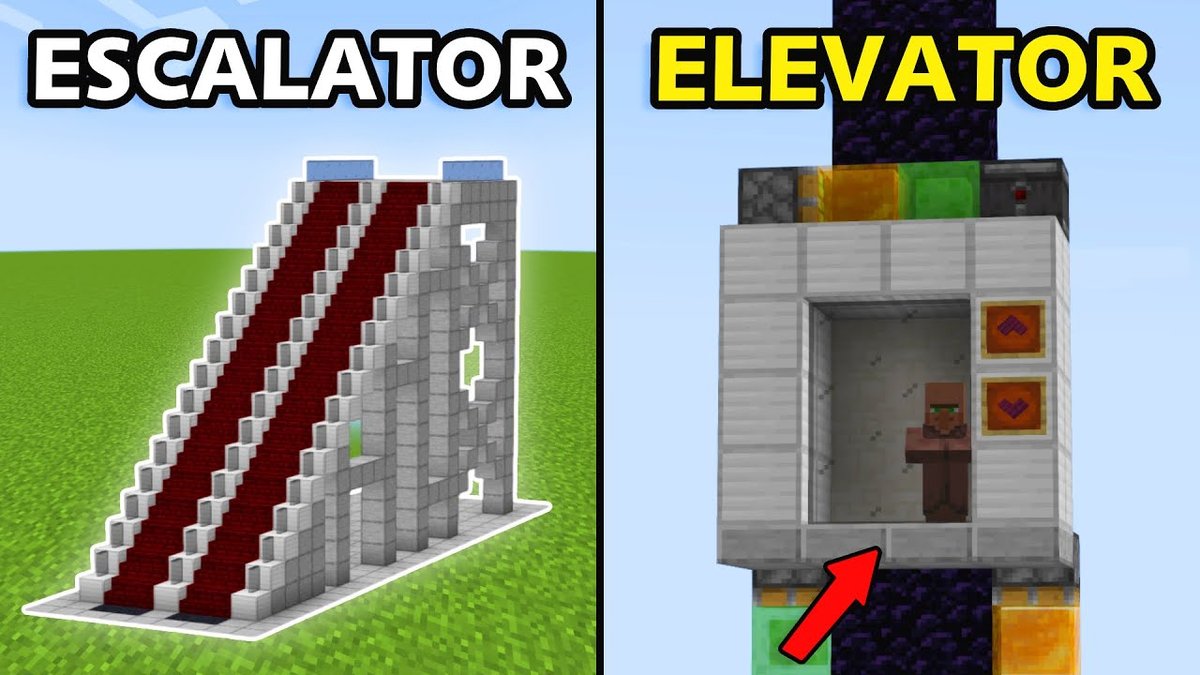
- Redstone Elevators: Using pistons and slime blocks, you can create functional Minecraft elevators that rapidly transport you vertically. Simple designs use a stack of sticky pistons to push you up, while more complex ones employ flying machine principles for smooth, multi-floor travel.
- Minecart Systems: Automate your railway networks! Redstone can control powered rails, send minecarts to specific destinations, and even summon empty carts for players. Imagine a network that, with a push of a button, sends you directly to your farm, mine, or a friend's base.
- Mob Transport: Pistons and water streams can guide mobs into specific pens or traps.
Security & Stealth: Automatic Doors & Traps
Beyond convenience, Redstone offers tools for security and mischief.
- Mob-Proof Doors: Design doors that only open to players, using combination locks or hidden buttons, keeping unwanted guests (like zombies or creepers) out of your base.
- Combination Locks: Utilize Redstone logic gates (AND gates, OR gates) with levers to create doors that only open when a specific sequence or combination of levers is activated.
- Advanced Traps: From simple pitfall traps triggered by pressure plates to elaborate TNT cannons or suffocating piston traps, Redstone provides endless possibilities for defending your territory or pranking your friends.
The Rhythm of Redstone: Music Machines & Note Blocks
Redstone isn't just about utility; it's also about creativity and expression.
- Note Blocks: These blocks produce musical tones when powered. Place them on different blocks (e.g., wood, stone, glass) to change their instrument sound. Right-clicking changes their pitch.
- Music Machines: Combine note blocks with Redstone repeaters (for timing) and observers (for compact pulses) to create intricate musical compositions or even play popular songs. The world of Minecraft music is a vibrant subculture for Redstone enthusiasts.
Building the Impossible: Flying Machines & Rube Goldberg Contraptions
For those who love to push the boundaries, Redstone facilitates truly awe-inspiring creations.
- Flying Machines: Using slime blocks, sticky pistons, and observers, you can construct contraptions that literally fly across your world, pushing and pulling blocks as they go. These are often used for automatic trench diggers, tree farms, or even mobile bases.
- Rube Goldberg Machines: These are elaborate, chain-reaction devices designed to perform a simple task in the most overly complicated way possible. Redstone is perfect for creating these intricate sequences, combining pistons, droppers, water, and various activators into a delightful cascade of events.
- Block Update Detectors (BUDs): While not a "build" in itself, understanding BUDs (which often use observers or Quasi-connectivity with pistons) is crucial for advanced automation, allowing your circuits to react to subtle changes in the world around them (e.g., when a plant grows or a block is placed/broken).
Advanced Redstone Mastery: Logic, Computation & Beyond
For the truly ambitious, Redstone goes beyond simple automation and delves into the realm of digital logic and in-game computation.
Understanding Logic Gates: The Digital Brains of Redstone
Just like real-world computers, Redstone can be used to build logic gates – fundamental circuits that take one or more inputs and produce a single output based on a logical rule.
- AND Gate: Outputs a signal only if all its inputs are "on."
- OR Gate: Outputs a signal if at least one of its inputs is "on."
- NOT Gate (Inverter): Outputs a signal only if its input is "off" (and vice-versa).
- XOR Gate: Outputs a signal if its inputs are different (one on, one off), but not if both are on or both are off.
These basic gates are the building blocks for complex decision-making circuits, memory cells, and even processors.
Building In-Game Computers: From Calculators to Printers
The pinnacle of Redstone engineering involves constructing working computers within Minecraft itself. These colossal builds can perform arithmetic, store data, and even run simple programs. While incredibly challenging, there are tutorials for:
- Basic Calculators: Performing addition, subtraction, etc.
- Memory Cells (Latches & Flip-flops): Storing a single bit of information.
- Seven-Segment Displays: Showing numbers using Redstone lamps.
- Printers/3D Printers: These use pistons and dispensers to place blocks in complex patterns, essentially "printing" structures.
These projects showcase the incredible flexibility and depth of Redstone mechanics, proving that Minecraft can be more than just a game; it can be a platform for complex engineering.
Exploiting Mechanics: Zero-Ticking & Quasi-Connectivity Deep Dive
For ultra-compact and rapid circuits, expert Redstone engineers delve into specific game mechanics.
- Zero-Ticking: This refers to activating a piston in such a way that it extends and retracts within a single game tick. This often involves specific block placements that rapidly update the piston's state, allowing for extremely fast item elevators, block breakers, or clock mechanisms. While sometimes feeling like an exploit, it's a known and utilized mechanic.
- Quasi-Connectivity (QC): As mentioned earlier, QC allows a piston to be activated by power one block above it. Understanding and utilizing QC is vital for building compact Redstone designs, especially for piston doors and hidden entrances. It's a quirk that, once understood, becomes a powerful tool.
Leveraging Command Blocks for Ultimate Control
While not strictly Redstone, Command Blocks often work hand-in-hand with Redstone circuits. Redstone can activate Command Blocks, which in turn can execute powerful commands like teleporting players, changing game rules, spawning entities, or manipulating the world. This combination opens up possibilities for custom mini-games, complex adventure maps, and even more dynamic automation beyond what pure Redstone can achieve.
Common Redstone Questions & Troubleshooting
Even seasoned Redstone engineers run into problems. Here are some common questions and tips for when your circuit isn't cooperating.
"Why isn't my circuit working?"
- Power Source? Is your Redstone dust actually connected to a power source (lever, button, torch, daylight sensor)?
- Signal Strength? Is the signal reaching its destination? Redstone dust only travels 15 blocks. Use repeaters to extend its range.
- Directionality? Are hoppers facing the right way? Are pistons pointing correctly?
- Interference? Is your Redstone dust accidentally powering an adjacent component you didn't intend to, or is another power source interfering?
- Timing? For complex circuits, timing is everything. Use repeaters to introduce necessary delays.
"What exactly is Quasi-connectivity?"
Quasi-connectivity (QC) means a piston (or dispenser/dropper) can be activated by a powered block that is not directly adjacent to it, but one block above its top face, or diagonally adjacent to that top block. It's a legacy behavior from early Minecraft and acts like the piston is "looking" for power in that specific area. Many compact piston doors rely on this mechanic. It's confusing at first, but once you grasp it, you can use it to your advantage.
"How do I make my builds more compact?"
- Observers: These are kings of compactness, providing short, precise pulses for block updates.
- Redstone Blocks: A solid block of Redstone can be pushed by pistons, acting as a movable power source, useful for compact flying machines or logic.
- Zero-ticking and QC: Mastering these advanced mechanics allows for extremely tight designs.
- Verticality: Don't just build flat; utilize the Z-axis. Stagger Redstone lines using slabs or glass, which don't conduct Redstone signals, to prevent accidental connections.
"Where can I find schematics and build ideas?"
Minecraft's community is a treasure trove of Redstone genius. You can find schematics (diagrams for circuits) in various formats:
- Modern Schematics: Often use simplified block representations for clarity. Many tutorials feature step-by-step visual guides.
- MCRedstoneSim Schematics: An older, less common method from specific Redstone simulators.
- YouTube Tutorials: The most common source for visual, step-by-step guides. Search for specific build types (e.g., "Minecraft automatic farm tutorial").
- Dedicated Forums & Wikis: Sites like the official Minecraft Wiki and various community forums host detailed explanations and designs.
Your Journey to Redstone Automation: Next Steps
You've explored the foundational mechanics, envisioned practical applications, and glimpsed the cutting edge of Redstone engineering. The journey from a novice Redstone tinkerer to a master of automation is a rewarding one, filled with "aha!" moments and satisfying creations.
Don't be afraid to start small. Build a simple automatic door, then an automatic farm, then experiment with a basic logic gate. Each successful build will deepen your understanding and fuel your ambition. The Minecraft community is vibrant and helpful, so don't hesitate to seek out tutorials or ask for help when you're stuck.
The only real limit to what you can achieve with Redstone is your imagination. Whether you dream of an entirely automated base, a giant Redstone computer, or simply a convenient sorting system, the tools are now at your disposal. So, gather your Redstone dust, grab some repeaters, and start building—your automated Minecraft future awaits! For even more inspiration and designs to spark your next project, remember to Explore the Grabcraft Hub and see what incredible creations others have brought to life.